[1] "Gillenia trifoliataproductThumbnailQuantityLabel"
[2] "1"
[3] "Gillenia trifoliata"
[4] "1 bare root"
[5] "WS8R9FWSGM"
[6] "(-£0.22)" I have recently gotten access to a garden. After being a bit kamikaze with a hedge trimmer, clearing ivy, brambles and bamboo roots - it is time to start thinking about what to put in it. If you want to skip the why I am webscraping plant data - skip to the webscrape section, otherwise buckle up for a ramble about garden challenges!
I still have a LOT of roots to clear out…
1 The state of the garden
Realistically this is a multi-year project which will never be finished, subject to many changing external factors1. I have to be patient and see what happens!
1 Just like a PhD really!
Now the garden. It is north-west facing so receives sun in the afternoon. The main bed ready to planted (aka been annihilated from brambles, a dodgy thuja (non-native) shrub-going-on-tree, enormous ivy roots) is in the shade, pretty much all the shade, permanently/all year-round so far. This is the main focus at the moment.
The other bed at the end of the garden is partially sunny/full sun raised bed. In it I have already planted a reduced-to-clear clematis (having the time of it’s life). My plan for there is a rose in the partially shady area. I want to make a bed on the sunny side (more brambles to grapple with, a holly, and a baby hawthorn). Then is a small tree and an old wirey hardy rosemary bush I’ve propped up with bamboo but feels as exhausted as I do.
Maybe Paul’s Himalayan Musk or Phyllis Bide or Lady of the lake? I think I just love the names
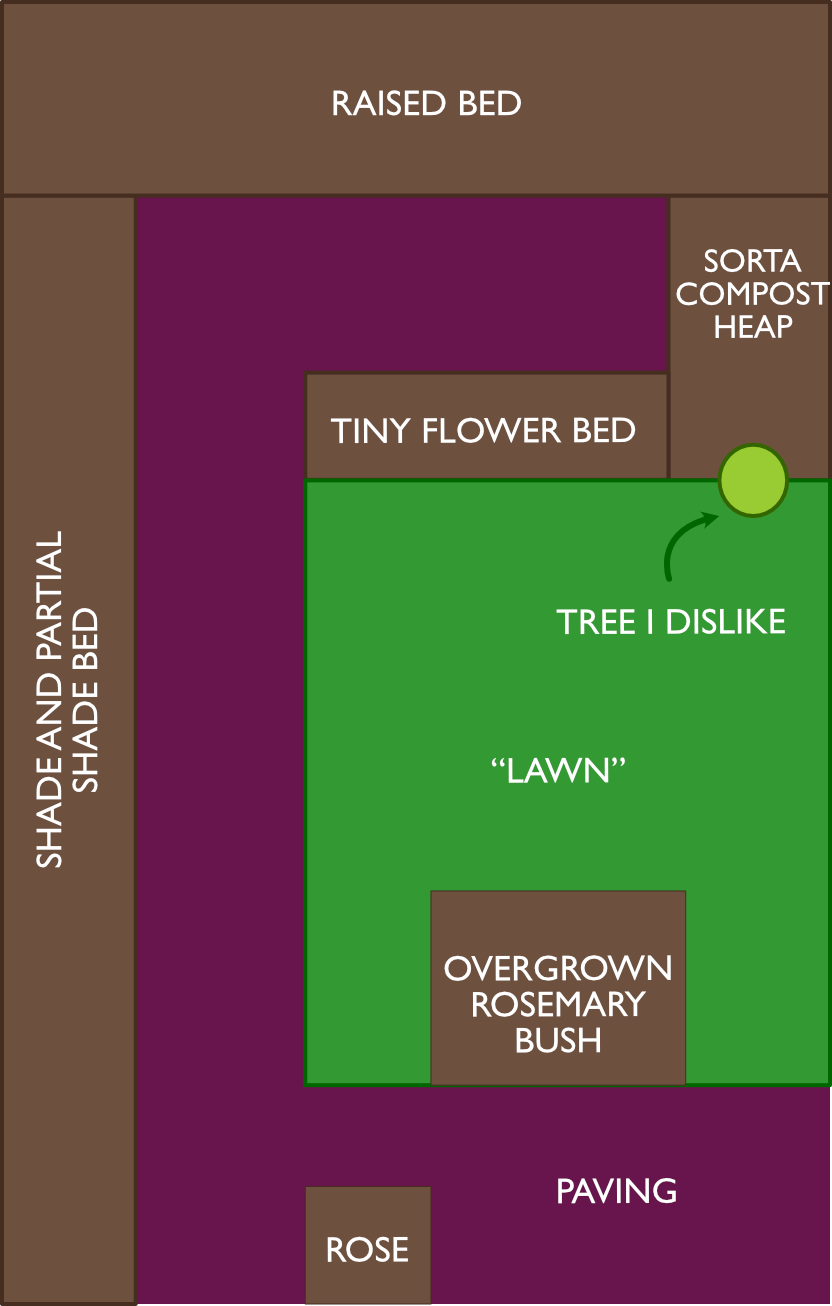
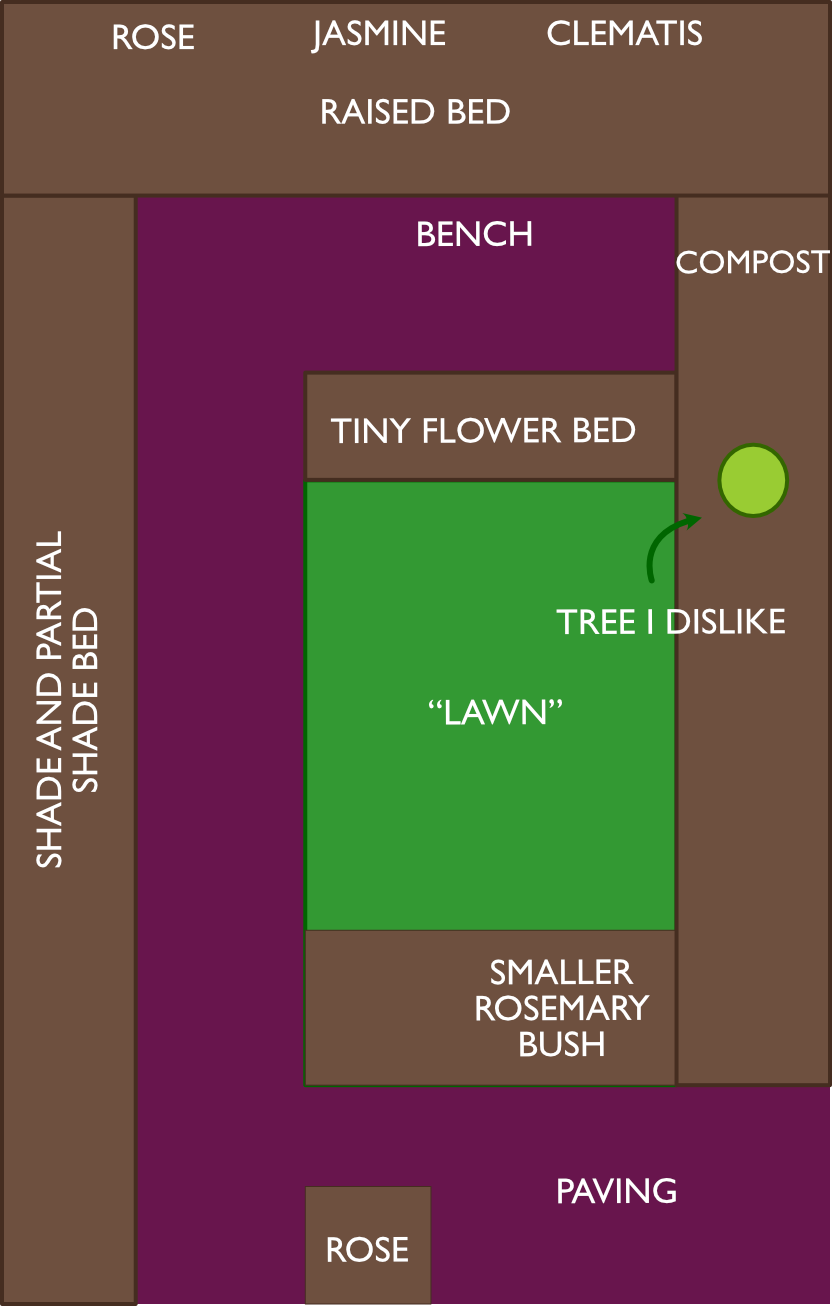
Here is a plan of the garden before and after
1.1 I went shopping and bought bare roots
Solution! I do not have lots of money to spend on (spenny) mature plants. I am not too impatient to start by seed, but I have missed the boat and I would like to enjoy something in the garden this summer! So the solution: bare roots, perennials.
Speaking to gardening folk, not a common tactic to go, bar maybe Peonies or Dahlias, quite uncommon. So it is a bit of an adventure!
Why perennials? I would like a garden to maintain, and I like the idea of things coming back, year after year, maybe with a little encouragement!
Thus, I went shopping and I bought some bare roots perennials!
1.2 I am but a beginner who know nothing
As a biologist, I feel I should know a little about plants, but often this is not in a way a gardener cares and grows them. Also I specialise in animal behaviour and social networks… so quite different!
With my order, the website has lots of information. I don’t want to be clicking into it every time to see when I should plan x, y and z.
Hence, I want to webscrape all the information from my order, into a spreadsheet.
And here is how I did it.
2 Webscraping: from data to gardener!
2.1 What did I buy? The task of tidying up a terrible csv
First I download the order confirmation. I put it into a csv but it’s not going to work with readr, as not a csv. Instead I need to read lines. Here is the first 5 lines2
2 Yucky.
Next we filter out only lines with flower names and bare root counts as I only want the plant information!
We assume flower names have alphabetic characters and possibly single quotes, and that the bare root count lines contain “bare root” or “tuber” or “corms” so I can figure out how much I actually have to plant.
# A tibble: 24 × 2
   flower_name                    bare_roots
   <chr>                          <chr>
 1 Gillenia trifoliata            1 bare root
 2 Echinacea 'Blackberry Truffle' 1 bare root
 3 Iris 'Just Around Midnight'    1 bare root
 4 Dahlia 'Labyrinth'             1 tuber
 5 Dahlia 'Café au Lait'          1 tuber
 6 Anemone 'Whirlwind'            1 bare root
 7 Anemone 'September Charm'      1 bare root
 8 Allium 'Millenium'             3 bare roots
 9 Tricyrtis 'Blue Wonder'        3 bare roots
10 Gypsophila paniculata          5 bare roots
# ℹ 14 more rows
Now we have a nice neat data frame of what I have ordered.
Which means I have
2.2 Information from the webstore
Using an inspect on Chrome, the information I want is in the “Specs and Info” section. Let’s try with a Dahlia ‘Cafe au Lait’ first:
Settings -> More tools -> developer tools. It higlights the sections you are working with to figure out what you need. I am not going to go indepth with this at the moment!
# A tibble: 1 × 25
  `Botanical name`      `Dahlia division`         `Flower colour` `Tuber size`
  <chr>                 <chr>                     <chr>           <chr>
1 Dahlia 'Café au Lait' Decorative dahlia (Div 5) Cream, pink     1
# ℹ 21 more variables: `Established height` <chr>, `Established spread` <chr>,
#   `Plant spacing` <chr>, `Leaf colour` <chr>, Habit <chr>,
#   `Life cycle` <chr>, Hardiness <chr>, `Years to establish` <chr>,
#   Sunlight <chr>, Position <chr>, `Suitable for` <chr>, `Soil acidity` <chr>,
#   `Soil moisture` <chr>, `Soil type` <chr>, `Growing skill` <chr>,
#   Scented <chr>, `Pollinator-friendly` <chr>, `Mouse resistant` <chr>,
#   `Rabbit resistant` <chr>, `Deer resistant` <chr>, Toxicity <chr>
That gets the information and the column names should (in theory) stay the same.
Next we prepare a list of URLs structure for all plants in the table:
Then we loop through each url to extract the data. As polite bow adds a delay, it will take sometime deliberately!
All that is left to do is to take the list and convert it into a table:
Fantastic. Now to figure out which to plant where, I need to figure out the height classes, so I don’t plant a big plant infront of another!
Lets recap this workflow as flowchart
3 When do I need to plant by? When will they flower?
Silly me! I forgot to check when everything needs to be planted by - I might have to do it all at once! On the website, using web inspector, there is a table with active and inactive squares. First with Dahlia as a test, lets extract this:
{xml_nodeset (3)}
[1] <tr>\n<th class="product-calendar__months label-medium weight-medium">Jan ...
[2] <tr>\n<td class="planting-item">\n              </td>\n<td class="plantin ...
[3] <tr>\n<td class="flowering-item">\n              </td>\n<td class="flower ...
2nd row is planting and 3rd row is flowering timing.
       Month Planting Flowering
1    January    FALSE     FALSE
2   February     TRUE     FALSE
3      March     TRUE     FALSE
4      April     TRUE     FALSE
5        May     TRUE     FALSE
6       June     TRUE     FALSE
7       July    FALSE      TRUE
8     August    FALSE      TRUE
9  September    FALSE      TRUE
10   October    FALSE      TRUE
11  November    FALSE     FALSE
12  December    FALSE     FALSE
Nice! But I need all of the plants… Once again back to a loop to see how screwed I am:
Rows: 288
Columns: 4
$ url       <chr> "https://www.farmergracy.co.uk/products/gillenia-trifoliata-…
$ Month     <chr> "January", "February", "March", "April", "May", "June", "Jul…
$ Planting  <lgl> FALSE, TRUE, TRUE, TRUE, TRUE, TRUE, FALSE, FALSE, FALSE, FA…
$ Flowering <lgl> FALSE, FALSE, FALSE, FALSE, FALSE, FALSE, TRUE, TRUE, TRUE, …
Each row is a month and flower combination with true or false for planting and flowering. In other words the data is in a long format. This is great for plotting but in my opinion, hard for human brain to comprehend.
So how much do I have to panic in the next couple of weeks?
I am going to plot this out. I first am going to change months to numbers so easier to plot later on. I am also going ot add the flower name so I can use that instead of the URL.
                                                                       url
1 https://www.farmergracy.co.uk/products/gillenia-trifoliata-bare-roots-uk
2 https://www.farmergracy.co.uk/products/gillenia-trifoliata-bare-roots-uk
3 https://www.farmergracy.co.uk/products/gillenia-trifoliata-bare-roots-uk
4 https://www.farmergracy.co.uk/products/gillenia-trifoliata-bare-roots-uk
5 https://www.farmergracy.co.uk/products/gillenia-trifoliata-bare-roots-uk
6 https://www.farmergracy.co.uk/products/gillenia-trifoliata-bare-roots-uk
     Month Planting Flowering Month_num         flower_name
1  January    FALSE     FALSE         1 Gillenia trifoliata
2 February     TRUE     FALSE         2 Gillenia trifoliata
3    March     TRUE     FALSE         3 Gillenia trifoliata
4    April     TRUE     FALSE         4 Gillenia trifoliata
5      May     TRUE     FALSE         5 Gillenia trifoliata
6     June     TRUE     FALSE         6 Gillenia trifoliata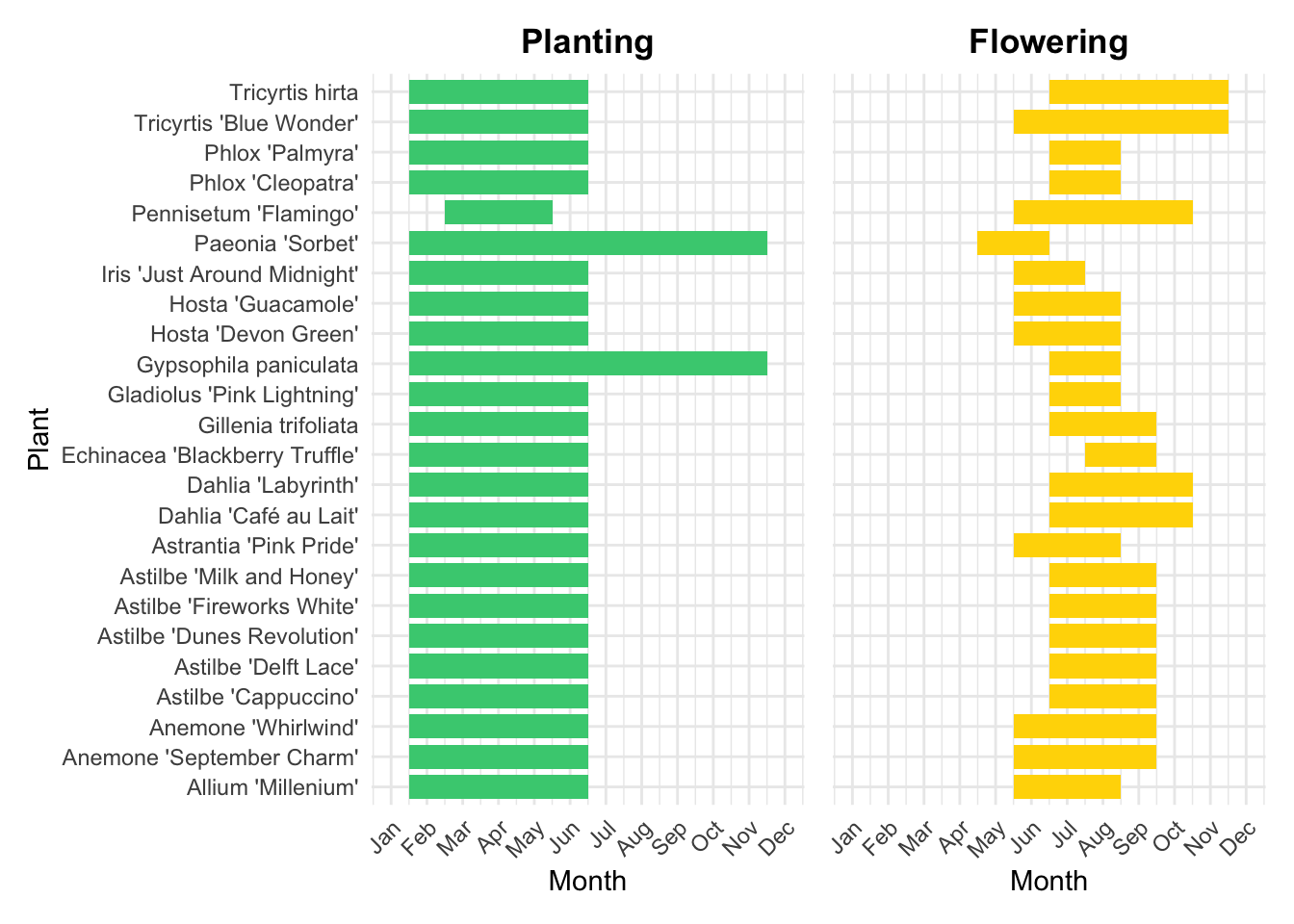
So effectively. Everything!
I am going to be busy!!!